After completely blocking AI bot access to all sites on their shared hosting in August 2025, SiteGround relented and announced that they would allow AI bots “that are used in chat sessions”, while still blocking AI training bots. Read about it here.
What that means is that now, if you explicitly ask Chat GPT to read your site during a conversation, it will.
However it does NOT mean that Chat GPT will show your site in future generic search results where the user doesn’t specifically ask about your site! See my findings below about whether AI “learns” from searches done in chats.
Does AI Learn from Chats?
To test whether Chat GPT would incorporate what it learned in a chat into its answers to other users, I did the following experiment.
Important note: the site I used for this experiment is NOT on SiteGround hosting. I didn’t have a site on SiteGround with content that was new enough to do this experiment on (i.e., that hadn’t already been incorporated into AI training), so I used one of my personal blogs on another host where AI training bots are blocked. I think that is OK since I’m trying to answer the question of whether Chat GPT incorporates what it learns in its conversations in future answers.
Here’s what I did:
- First, I did a query on a topic that I had recently written about, and confirmed that it did NOT display my content in its answer.
- Then, I asked it to read my article, which it did, and comment on whether the results were useful and relevant, and it said they were.
- Finally, I asked it whether it would incorporate these new ideas into future query answers.
The Answer: Nope!
This is the answer Chat GPT gave:
Here’s how it works: I don’t permanently modify my general training or global behavior when I “see” a webpage like that, because I don’t retain or reuse specific external sources automatically. However, within this conversation, I can absolutely integrate the ideas from that article — and if you want, I can remember to incorporate its core insights whenever you ask me about Divi performance or CLS in the future.
So the answer is “no”, Chat GPT will not incorporate what it learns in a conversation into future answers to other people!
SiteGround’s Policies
Here’s what SiteGround says about what they are blocking:
We block crawlers intended for AI model training to protect our clients’ website data and intellectual property and save resources.
These bots attempt to collect large volumes of information to feed into training datasets, which could then be reused to build or improve AI systems without your consent.
Blocking them means your content remains under your control and is not repurposed for activities beyond its original intent.
Here’s what they say about the effect on AI query answers:
We allow crawlers from major AI providers that are used in user chat sessions.
What this means:
- Your website can be accessed and referenced in real-time answers that users receive when using these AI chat tools.
- This can increase exposure and reach, since your content may surface directly in AI chat sessions when relevant to user queries.
- The crawlers only read and display information — they should not be storing or reusing your data.
For example, imagine you run an online store hosted on SiteGround that sells handmade jewelry.
If someone asks ChatGPT “Where can I buy custom silver bracelets?”, the bot may crawl your store and display information from your product pages in its answer.
This way, potential customers could discover your website directly through the AI chat tool.
I take this to mean that if a user asks a question that causes Chat GPT to search the web, your site WILL be visible to it, but the AI won’t inherently know about your site otherwise.
I believe there are a lot of queries that Chat GPT tries to answer on its own, without crawling the web, and not having the AI trained on a commercial site is extremely detrimental to a site that you want publicized!
The Workaround
SiteGround does provide a workaround to allow AI training bots, outlined in their article:
If you have a specific reason to allow such crawlers to access your site, you have to submit an inquiry through our Help Desk > Other > AI Crawlers Setup.
Our support team will review your request and apply the change if appropriate.
They now have a nicer UI to do this:
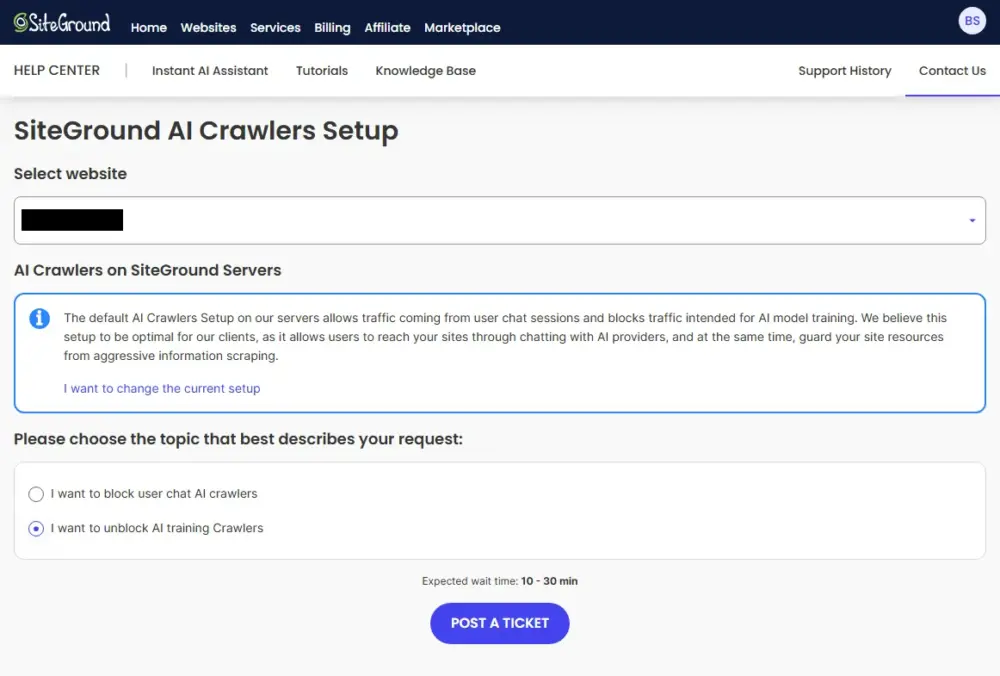
I did this process, which required me to explain the reason for the request in a ticket. A few minutes later, I got a response letter, basically saying, “Are you sure you want to do this?”, and I had to explain myself again.
Needless to say, this is kind of a pain to do on dozens of sites! I’d much rather have a simple slide toggle to enable access to AI training bots!
What do you think? Please comment below! – Brian

I am a freelance web developer and consultant based in Santa Monica, CA. I’ve been designing websites using WordPress and from scratch using HTML, CSS, PHP, and JavaScript since 2010. I create websites and web applications for businesses, nonprofits, and other organizations. I have a degree in Electrical Engineering (BSEE) from California Institute of Technology and a degree in Engineering Management (MSEM) from Stanford University. If you need help with your site, you can hire me!
Please Leave a Question or Comment
Hello, how was the result whit this?…sadly even if siteground allow chatgpt to access your site,it wont show your site in your gpt chats… I guess it needs full access to training its AI to fully recommend you.
Hi Carlos,
I was wondering about that question as well. After Siteground’s change, Chat GPT can see my site if I specifically ask about it, but I wasn’t sure about showing it in search results.
So, I actually just did an experiment where I asked Chat GPT to read my site, then asked if it would incorporate my site into future query results. The answer was “no”!
I don’t permanently modify my general training or global behavior when I “see” a webpage like that, because I don’t retain or reuse specific external sources automatically.
This is really bad. I’ll update this article and contact Siteground about it. Perhaps you can too to make this a higher priority with them.
Best,
Brian
Hi Carlos,
See my updated article. I did some more experiments and research with some important results.
Brian
Thanks for the fast reply. They said once to me, that the problem is that the sharing hosting gets overloaded with bots requests… but going to ask again.
Yeah, in the end, using the links in the article, I was able to open a ticket to request AI bot access, and they did it pretty quickly (I don’t really have a way to verify though).
hey Brian, It’s been a month since you requested AI bot access… what was the result? does the server gets overloaded?
can you share your experience?
Thanks! =)
Hi Carlos,
Looking at the site’s traffic logs, I do see a day with a spike of 500 visitors when the normal is around 100 or so. It’s possible that was bot traffic. In any case, it didn’t bring down the site.
Brian
I just did this same thing. I was in a chat with them, but googling this topic and found your blog. I submitted the ticket for AI crawling to be added to my site.
I think it’s kind of ridiculous they would block this type of traffic by default and not make it the opposite, where you’d need to disable this option if thats what you wanted.
users aren’t starting their searches on ai models asking about specific sites or vendors, why would they think conversational only would be a good service for any of their clients. For months, my website has no gone unindexed in the hive mind of these AI models and am behind the competition.
Yes, totally agree! Keep complaining to SG about this!!
Siteground says they are doing this for me. They haven’t replied yet, but using the AI visibilty crawler tools across the web are giving my websites a pass now, instead of a fail like they have been, so I’m assuming they are working on it.
I hope this helps our businesses visibility in AEO and am upset I wasn’t aware of this option prior, or that I would need to even ask for this. I appreciate you taking the time to write this blog.
Thanks for the update. Can you provide a link to some of those visibility crawler tools?
I think AI Visibility is different from access from AI Training bots. The first means that if you ask AI about your site, it can read it. The second means that AI “knows” about your site without having to read it in real time.
So I just want to make sure those tools are checking the right thing.
Thanks,
Brian
Hey Brian, thanks for taking the time to reply, I wanted to ask you, have you noticed any increased in visitors thaanks to IA?… how is you traffic increased (real visitors) aftear the change?
Algo @Gdiddy, can you share your experience also?
Thanks!
Hi Carlos,
No, I didn’t notice a huge increase in either, but these were pretty low traffic sites.
Brian
Hey Giddy, did you notice increase in traffic after IA? it is better?