One of my clients discovered that any email he sent that contained a Vimeo link was flagged as spam by Gmail recipients. All other email passed through fine.
In the recipient’s junk box, the email had this ominous warning attached to it:
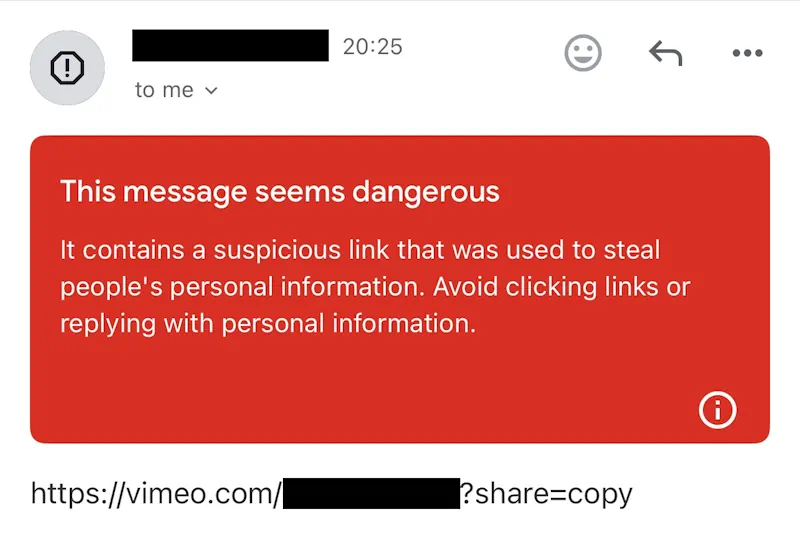
Researching this further, I found he wasn’t the only one:
- https://www.reddit.com/r/GMail/comments/1kb7e5y/ingoing_and_outgoing_emails_with_clients_suddenly/
- https://www.reddit.com/r/vimeo/comments/1km18xv/emails_containing_vimeo_links_being_flagged_as/
Many others have had this problem with no solution.
The Solution
Probably the easiest solution is to use a URL shortener like bitly or the Google URL Shortener for the Vimeo links and embed those in your email instead. That should work for most people.
In my case, the client had a bunch of Vimeo videos to email out, each with a different URL. He didn’t want to have to create separate shortened links for each video. So, I created a single page where you pass the Vimeo ID in the URL, and it redirects to the corresponding Vimeo page. No URL shortener needed.
This can be done most seamlessly at the server site, but it might be simpler for most people to implement in JavaScript, because all you have to do is paste it into the content of the page. That’s what I did. Here’s the code from Chat GPT:
// This script gets the Vimeo video ID from the query string (?id=VIDEO_ID)
// and redirects the user to https://vimeo.com/VIDEO_ID

(function () {
  // Parse the URL search parameters
  const params = new URLSearchParams(window.location.search);

  // Get the 'id' parameter
  const videoId = params.get('id');

  // If a video ID is found, redirect to the Vimeo video
  if (videoId) {
    const vimeoUrl = `https://vimeo.com/${encodeURIComponent(videoId)}`;
    window.location.href = vimeoUrl;
  } else {
    console.error('No Vimeo video ID found in the query string (e.g., ?id=123456789).');
  }
})();
Just visit the page with a query string, such as “https://www.yoursite.com?id=123456789” and it will redirect to the Vimeo video with that ID number
Conclusion
Let me know if this worked for you, or if you found a different solution in the comments below. – Brian

I am a freelance web developer and consultant based in Santa Monica, CA. I’ve been designing websites using WordPress and from scratch using HTML, CSS, PHP, and JavaScript since 2010. I create websites and web applications for businesses, nonprofits, and other organizations. I have a degree in Electrical Engineering (BSEE) from California Institute of Technology and a degree in Engineering Management (MSEM) from Stanford University. If you need help with your site, you can hire me!
Please Leave a Question or Comment